An analog-style compressor for live sound, tuned for vocals. VST3 / AU / Standalone on Windows and Mac. Zero latency (0 samples): no lookahead and no oversampling, so it is safe on stage monitor channels.
Install
- Windows (VST3): unzip and copy T-Sound Live Comp.vst3 to C:\Program Files\Common Files\VST3\
- Mac (VST3): copy T-Sound Live Comp.vst3 to /Library/Audio/Plug-Ins/VST3/
- Mac (AU for Logic / GarageBand): copy T-Sound Live Comp.component to /Library/Audio/Plug-Ins/Components/
- Mac (first time after installing): open Terminal, paste the command below and enter your Mac password when asked, so macOS allows the downloaded plug-in. Then reopen your DAW.
- Rescan plug-ins in your DAW (or Signal Rack). It is listed under Dynamics, maker T Sound Man.
sudo xattr -dr com.apple.quarantine "/Library/Audio/Plug-Ins/VST3/T-Sound Live Comp.vst3" "/Library/Audio/Plug-Ins/Components/T-Sound Live Comp.component"
Quick start
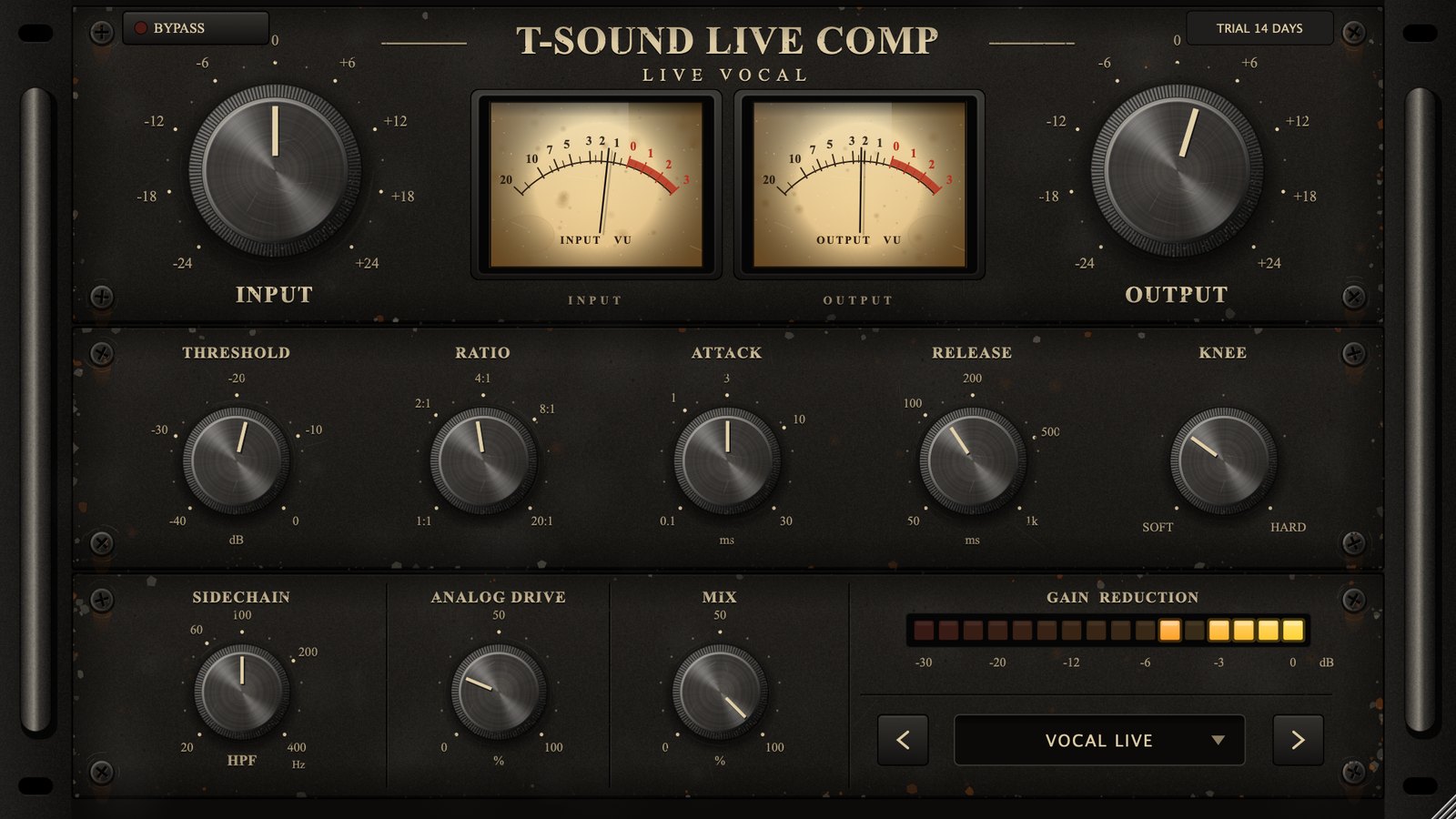
- Insert it on the vocal channel, after the low-cut EQ.
- Pick the VOCAL LIVE preset (bottom right, or step with < >).
- Set INPUT so the INPUT VU swings around 0 VU at normal singing level.
- Watch GAIN REDUCTION: about 3–6 dB on normal singing is a good start. Too much? Turn THRESHOLD up.
- Match the level with OUTPUT so the OUTPUT VU reads about the same as with BYPASS on.
Top row
- BYPASS (top left) — red lamp = bypassed. 10 ms crossfade, no click.
- INPUT — gain into the compressor, −24 to +24 dB. More input = more compression and more drive.
- Twin VU — 0 VU = −18 dBFS RMS. Left needle: level after INPUT (gain staging). Right needle: level after OUTPUT.
- OUTPUT — makeup gain, −24 to +24 dB.
- TRIAL / LICENSED badge (top right) — trial days left; click to enter a licence key.
Middle row: dynamics

- THRESHOLD −40 to 0 dB — where compression starts.
- RATIO 1:1 to 20:1 — 20:1 is close to limiting.
- ATTACK 0.1–30 ms — short catches transients, long lets the start of words through.
- RELEASE 50–1000 ms — recovery time. Long sustained compression recovers more slowly (opto-style); short peaks recover at the knob's speed.
- KNEE SOFT (18 dB) to HARD — soft starts compressing gently below the threshold, sounds more natural.
Bottom row

- SIDECHAIN HPF 20–400 Hz — filters only the detector, not the audio, so breaths, pops and low end do not trigger compression.
- ANALOG DRIVE 0–100 % — tube/transformer-style warmth (even harmonics). At 0 % the signal is untouched.
- MIX 0–100 % — dry/wet for parallel compression (great on drums).
- GAIN REDUCTION — LED meter with a 1.5 s peak hold.
- Presets — 12: VOCAL LIVE, VOCAL BALLAD, VOCAL ROCK, SPEECH / MC, BACKING VOCAL, ACOUSTIC GUITAR, BASS DI, KICK, SNARE, DRUM BUS PARALLEL, MIX BUS GLUE, SAFETY LIMITER.
Tips
- Double-click any knob to reset it; dragging shows the value.
- Resize the window from the bottom-right corner; everything is drawn in code and stays sharp.
- SAFETY LIMITER is an emergency catch, but with no lookahead very short peaks can slip through slightly when the input is extremely hot. Do not use it as the system's main limiter.
Licence and trial
Fully working 14-day trial. When it ends without a licence the plug-in passes audio straight through (like BYPASS), so a show never goes silent. Buy a licence at tsoundman.com, click the TRIAL badge, paste the key (starts with FK2-) and press Activate.
If activation fails
- The licence window has Paste code from clipboard (pastes the key you copied) and Load key file... (reads the key from a .txt file). Both work even in hosts that block Ctrl+V / Cmd+V or right-click Paste inside plug-ins.
- Spaces and hidden characters that LINE or e-mail add to a copied key are removed automatically. Result messages always stay on top, so they never hide behind the host window.
- No licence code — the key box was empty. Copy the key again and click Paste code from clipboard, or save the key in a text file and use Load key file...
- Could not connect to the licence server — check the internet connection, then update to the latest version from the product page or My library. New versions activate through tsoundman.com, which every network can reach.
- Invalid licence code — the key must start with FK2- and belong to this product (a key for one product does not work in another). If it still fails, send a screenshot on LINE and we will check it or issue a new key.