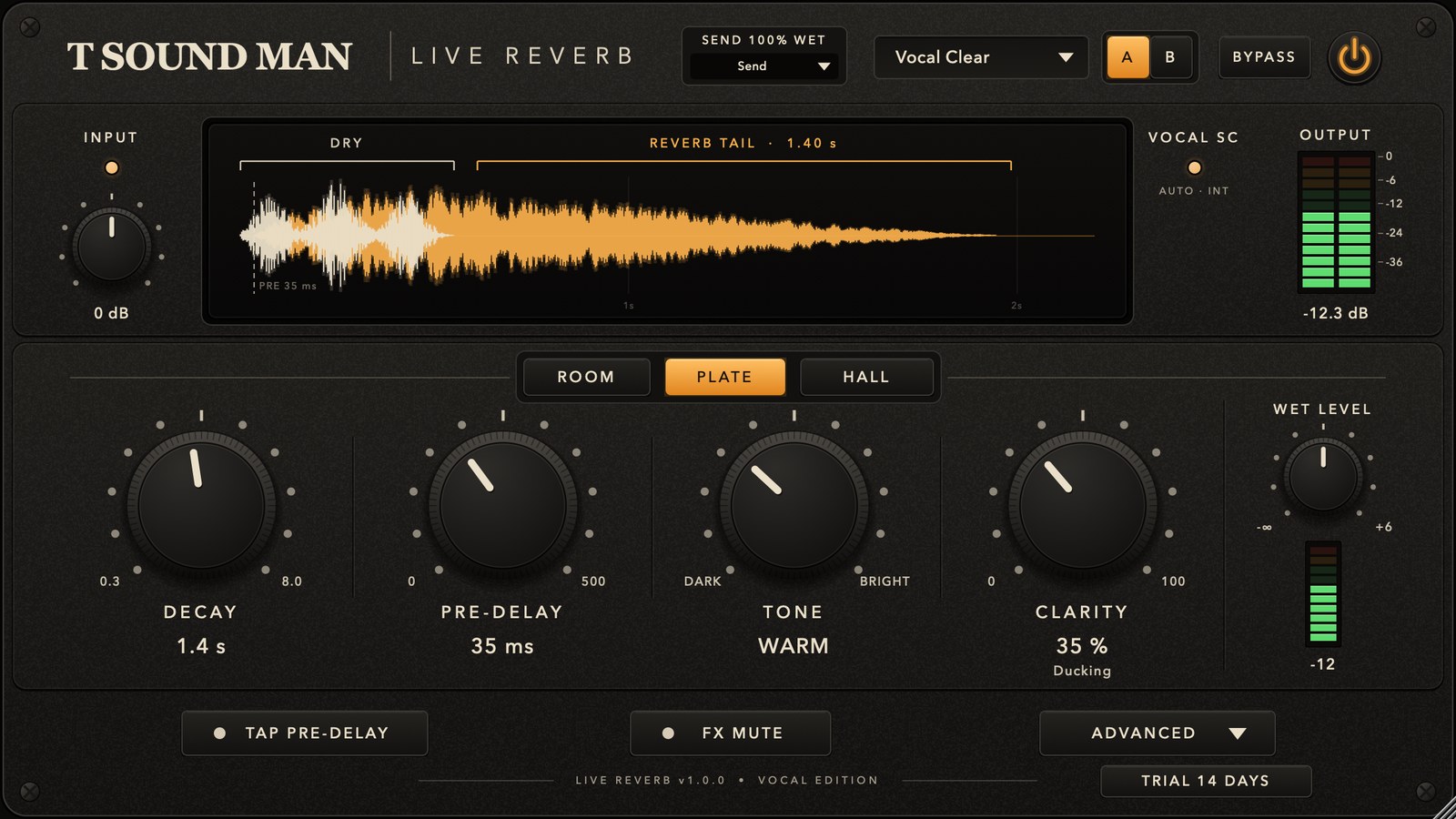
A vocal reverb for live sound. VST3 / AU / Standalone on Windows and Mac, with three spaces (Room / Plate / Hall), Clarity that pulls the reverb down while the singer sings, and 15 vocal presets. No added latency (in Insert mode the dry vocal comes out exactly on time).
Install
- Windows (VST3): unzip and copy T-Sound Live Reverb.vst3 to C:\Program Files\Common Files\VST3\
- Mac (VST3): copy T-Sound Live Reverb.vst3 to /Library/Audio/Plug-Ins/VST3/
- Mac (AU for Logic / GarageBand): copy T-Sound Live Reverb.component to /Library/Audio/Plug-Ins/Components/
- Mac (first time after installing): open Terminal, paste the command below and enter your Mac password when asked, so macOS allows the downloaded plug-in. Then reopen your DAW.
- Rescan plug-ins in your DAW (or Signal Rack). It is listed under Reverb, maker T Sound Man.
sudo xattr -dr com.apple.quarantine "/Library/Audio/Plug-Ins/VST3/T-Sound Live Reverb.vst3" "/Library/Audio/Plug-Ins/Components/T-Sound Live Reverb.component"
Quick start (send / return)
- Insert it on an FX / aux channel (not the vocal channel) and set the top switch to Send (100% wet).
- Send the vocal to that FX from the mic channel's send.
- Pick Vocal Clear and bring up the send or the return until the reverb sits right.
- If the tail covers the words, raise CLARITY or choose a shorter preset.
- To use it directly on the mic channel instead, choose Insert and set INSERT MIX under ADVANCED.
Every preset is level-matched, so you can switch presets between songs without the reverb dropping out or jumping up.
Top row
- SEND 100% WET / Insert — Send outputs reverb only (for an FX bus); Insert blends the dry vocal with the reverb by INSERT MIX.
- Preset — 15 vocal presets; a * shows the preset has been edited.
- A / B — two sets of settings to compare.
- BYPASS / ⏻ — switches processing off with a crossfade, no click.
Display and meters

- INPUT — input gain −18 to +18 dB; the LED shows green / orange / red.
- Display — the dry signal, the pre-delay point and the tail length (to −60 dB) from the real settings.
- VOCAL SC — lights while Clarity is ducking the reverb and shows the detector source (AUTO / INT / SC).
- OUTPUT — left / right output meter.
Main controls
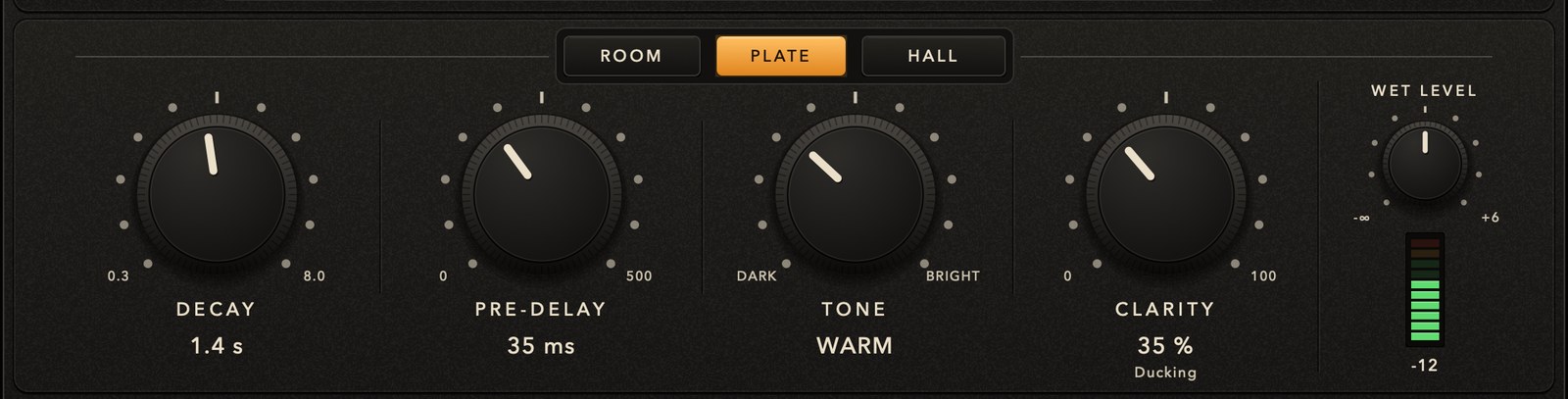
- ROOM / PLATE / HALL — a small natural room, a classic bright plate, a wide hall. Switch while playing, no click.
- DECAY 0.3–8 s — tail length (RT60 at 500 Hz), accurate for every style.
- PRE-DELAY 0–500 ms — gap before the tail starts; more keeps the vocal in front. 30–80 ms suits a lead vocal.
- TONE — DARK / WARM / NEUTRAL / BRIGHT: how fast the top end of the tail dies away (not an EQ).
- CLARITY 0–100 % — ducks the reverb up to 6 dB while the singer sings and lets the tail back in the gaps, so words stay clear.
- WET LEVEL −∞ to +6 dB — reverb return level, with meter.
Bottom row

- TAP PRE-DELAY — tap the beat; pre-delay = tapped interval × Tap Division (default 1/16). Decay is unchanged.
- FX MUTE — stops new signal entering the reverb and lets the tail ring out. Handy for talking between songs.
- TRIAL / LICENSED badge (bottom right) — trial days left; click it to enter a licence key.
ADVANCED (click ADVANCED to open)
- LOW CUT / HIGH CUT — filter the reverb only; the vocal is untouched.
- WIDTH 0–150 %, MODULATION, EARLY REF (early reflections).
- DUCK ATTACK / DUCK RELEASE — how fast Clarity reacts.
- INSERT MIX — reverb amount in Insert mode.
- DUCK DETECTOR — Auto (uses the sidechain when it has signal) / Internal / Sidechain.
- TAP DIVISION — 1/4, 1/8, 1/16, 1/32.
- FREEZE — holds the current tail indefinitely and ignores new input; for pads and ambience.
- IMPORT JSON / EXPORT PRESET / FACTORY — import and export presets, or restore the factory set.
The 15 vocal presets
- Vocal Clear (Plate 1.4 s) — everyday lead vocal, clear and not washy.
- Intimate Room (Room 0.7 s) — close, adds a sense of room.
- Warm Plate (Plate 1.6 s) — soft, darker tail.
- Bright Plate (Plate 1.3 s) — lead vocal with sparkle.
- Lead Hall (Hall 2.0 s) — more space, with ducking.
- Ballad Hall (Hall 2.6 s) — slow songs, long notes.
- Backing Wide (Hall 2.8 s) — backing vocals, wide and smooth.
- MC / Speech (Room 0.55 s) — host and speech, keeps words clear.
- Acoustic Vocal (Room 1.1 s) — voice with acoustic guitar.
- Pop Short Plate (Plate 0.9 s) — short tail for tight, upbeat songs.
- Gospel Hall (Hall 2.4 s) — full, open sound.
- Rock Vocal Plate (Plate 1.2 s) — dense tail, not harsh.
- Slap Chamber (Room 0.6 s, pre-delay 85 ms) — a distinct slap before the space.
- Dreamy Vocal (Hall 3.4 s) — obvious effect, long tail.
- Dry Stage Ambience (Room 0.45 s) — the smallest touch of room.
Tips
- Use send / return by default: several channels share one reverb, and each singer is set with their send.
- In a live-sounding room, use a shorter DECAY and more CLARITY.
- Stage monitors usually want less reverb than the front of house; send to them separately.
Licence and trial
Every feature works for a 14-day trial. When the trial ends without activation the reverb stops taking new signal (like FX MUTE): in Insert mode the vocal still comes through, in Send mode the reverb return goes silent, so the show never loses or doubles the vocal. Buy a licence at tsoundman.com, click the TRIAL badge at the bottom right, paste the licence key (it starts with FK2-) and press Activate.
If activation fails
- The licence window has Paste code from clipboard (pastes the key you copied) and Load key file... (reads the key from a .txt file). Both work even in hosts that block Ctrl+V / Cmd+V or right-click Paste inside plug-ins.
- Spaces and hidden characters that LINE or e-mail add to a copied key are removed automatically. Result messages always stay on top, so they never hide behind the host window.
- No licence code — the key box was empty. Copy the key again and click Paste code from clipboard, or save the key in a text file and use Load key file...
- Could not connect to the licence server — check the internet connection, then update to the latest version from the product page or My library. New versions activate through tsoundman.com, which every network can reach.
- Invalid licence code — the key must start with FK2- and belong to this product (a key for one product does not work in another). If it still fails, send a screenshot on LINE and we will check it or issue a new key.