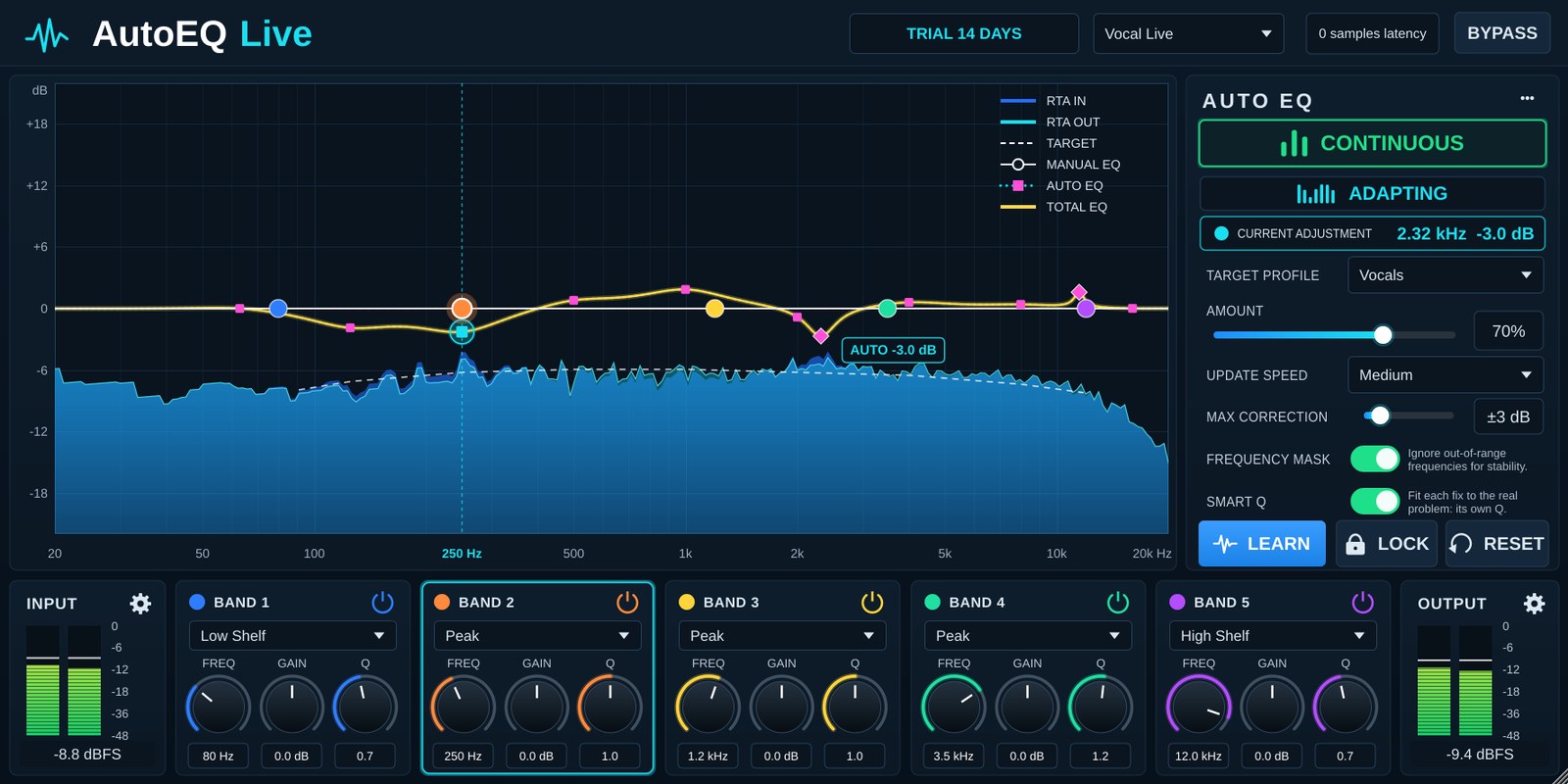
A 5-band EQ for live sound with Auto EQ, which listens to the signal and gently moves the tone towards a Target Profile. Made for vocal and speech mics on stage. VST3 / AU / Standalone on Windows and Mac. Zero latency (0 samples): every filter is IIR.
What's new in 1.0.2
- New Smart Q: analyses the sound at 1/12 octave. A narrow peak or dip is fixed at its own frequency and Q (up to 6 of them, shown as ◆ on the graph) instead of with a bell an octave wide.
- The 5 bands are independent of Auto EQ: your bands come after Auto EQ and always give exactly what you set (Auto EQ used to pull them back).
- Opens with flat bands: only Auto EQ works until you turn a band.
- Auto EQ boosts as well as cuts: Cut Only is gone; Max Correction sets how far it may go.
Install
- One-click installer (recommended): Windows: run AutoEQLive-…-Windows-Setup.exe. Mac: open AutoEQLive-…-macOS-Installer.pkg (right-click → Open the first time). It puts the plug-in in the right folders and replaces an older version.
- Or install by hand from the zip files:
- Windows (VST3): unzip and copy AutoEQ Live.vst3 to C:\Program Files\Common Files\VST3\
- Mac (VST3): copy AutoEQ Live.vst3 to /Library/Audio/Plug-Ins/VST3/
- Mac (AU for Logic / GarageBand): copy AutoEQ Live.component to /Library/Audio/Plug-Ins/Components/
- Mac (first time after installing): open Terminal, paste the command below and enter your Mac password when asked, so macOS allows the downloaded plug-in. Then reopen your DAW.
- Rescan plug-ins in your DAW (or Signal Rack). It is listed under EQ, maker T Sound Man.
Quick start
- Insert it on the vocal channel and pick the Vocal Live preset (top right).
- Let the singer sing for 5–10 seconds. ADAPTING lights up and the pink dotted AUTO EQ curve starts to move.
- When the tone sounds right, press LOCK to hold the curve for the show, or press LEARN to listen for 6 seconds and lock automatically.
- Shape the tone further with the 5 bands. They come after Auto EQ and are independent of it: Auto EQ never pulls back what you set.
Top row
- TRIAL / LICENSED badge: days of trial left. Click it to enter a licence key.
- Preset: 17 presets, listed under Presets below.
- samples latency: the plug-in's latency (always 0).
- BYPASS: switches processing off with a crossfade, so there is no click.
EQ graph
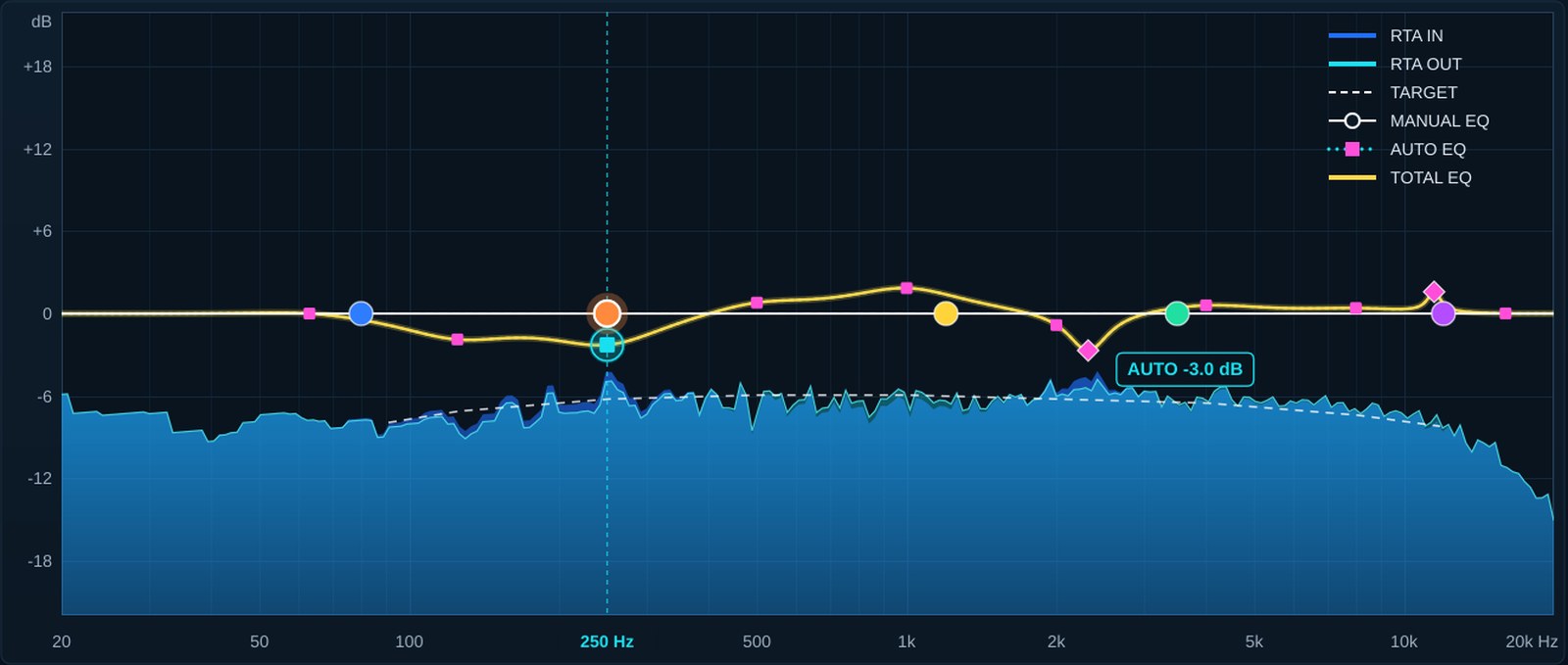
- RTA IN / RTA OUT: the spectrum before and after the EQ.
- TARGET (dashed): the tone of the selected Target Profile.
- MANUAL EQ (white): your 5-band curve.
- AUTO EQ (dotted): everything Auto EQ does. The 9 pink squares (63 Hz to 16 kHz) correct the broad balance; a ◆ diamond is a Smart Q band, sitting at the real frequency and Q of a narrow problem.
- TOTAL EQ (yellow): what the audio actually gets.
- Drag a coloured dot to set that band's Freq / Gain, turn the mouse wheel for Q, double-click to reset Gain to 0 dB.
AUTO EQ panel
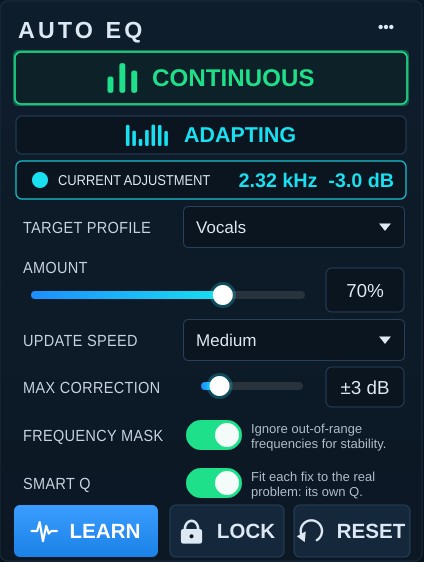
- CONTINUOUS: turns continuous adaptation on or off. When off, the Auto EQ curve eases back to flat.
- Status: ADAPTING, WAITING FOR SIGNAL, LEARNING xx% or LOCKED. Only audio above −60 dBFS is measured, so silence does not pull the curve.
- CURRENT ADJUSTMENT: the point being corrected the most, Smart Q bands included, e.g. 2.32 kHz −3.0 dB.
- TARGET PROFILE: Vocals, Speech, Acoustic, Full Mix, Flat, Main PA (a PA house curve: fuller low end, a gentle downward tilt and a roll-off above 8 kHz) and Mastering (the balance of mastered music, about 1.5 dB per octave down against pink noise).
- AMOUNT 0–100 %: how far to move towards the target.
- UPDATE SPEED: Slow (10 s average), Medium (4 s), Fast (1.5 s).
- MAX CORRECTION ±1 to ±12 dB: the limit for Auto EQ as a whole, boost and cut (an octave point and a Smart Q band on the same spot add up to no more than this). ±3 dB is recommended for live work.
- FREQUENCY MASK: leaves alone the ranges outside the profile and ranges too quiet to hold real signal.
- SMART Q: analyses at 1/12 octave and fixes narrow problems (mic or room resonances) at their own frequency and Q, up to 6 at once. A peak has to stay put for a few seconds first, and very narrow lines such as the harmonics of a sung note are left alone, so it does not chase the melody. With Smart Q off only the 9 octave points work.
- LEARN: listens for 6 seconds (counting only while there is signal), then locks the result. While it listens the button fills up as a progress bar; when done it turns green and reads LEARNED. RESET, a new LEARN or turning LOCK off brings it back to blue.
- LOCK: holds the current Auto EQ curve. Use it once the show starts.
- RESET: clears the Auto EQ curve and starts listening again.
- ••• button: RTA IN / OUT on or off, and Flatten manual bands (all bands back to 0 dB).
Presets
Pick one from the preset box at the top right. A preset sets the 5 bands, Target Profile, Amount, Update Speed and Max Correction together, then starts listening again.
- Vocal Live: General vocal mic (Vocals). The default when the plug-in opens: all bands flat, only Auto EQ working.
- Male Vocal / Female Vocal: Male / female vocal mic (Vocals)
- Backing Vocals: Backing vocal mics, slower and gentler (Vocals)
- Speech / Podium: Speech mic, podium (Speech)
- Pastor / Sermon: Preacher or long talks (Speech)
- Headset / Lavalier: Headset and lapel mics (Speech)
- Acoustic Guitar: Acoustic guitar (Acoustic)
- Piano / Keys: Piano, keyboards (Acoustic)
- Full Mix: Group or subgroup (Full Mix)
- Playback Track: Backing tracks, playback (Full Mix)
- Main PA - Music / Main PA - Speech: Main PA bus for music / speech events (Main PA)
- Mastering - Pop/Rock, EDM/Hip-hop, Acoustic/Jazz: Mastering or recorded music (Mastering)
- Flat / Init: Start from zero (Flat)
Bottom row: 5 bands and INPUT / OUTPUT

- Each band has an on/off button, a filter type (Low Cut, Low Shelf, Peak, Notch, High Shelf, High Cut) and FREQ 20 Hz–20 kHz, GAIN ±18 dB, Q 0.1–18.
- INPUT / OUTPUT: level meters. Click the gear to set the trim, −24 to +12 dB.
Tips
- Remove the low end with Band 1 (Low Cut) first so Auto EQ does not chase wind and stage rumble.
- For feedback, use Feedback Killer. Auto EQ corrects tone; it is not a feedback suppressor.
- Keep MAX CORRECTION low on stage. Small, continuous corrections sound more natural than big ones.
- Auto EQ can boost too. In a room that rings easily, keep Max Correction at ±3 dB and run Feedback Killer on the same channel.
Licence and trial
Every feature works for a 14-day trial. When the trial ends without activation, the Auto EQ curve returns to flat and stops adapting; the 5-band EQ, trims and bypass keep working, so the show never loses its sound. Buy a licence at tsoundman.com, click the TRIAL badge at the top, paste the licence key (it starts with FK2-) and press Activate.
If activation fails
- The licence window has Paste code from clipboard (pastes the key you copied) and Load key file... (reads the key from a .txt file). Both work even in hosts that block Ctrl+V / Cmd+V or right-click Paste inside plug-ins.
- Spaces and hidden characters that LINE or e-mail add to a copied key are removed automatically. Result messages always stay on top, so they never hide behind the host window.
- No licence code — the key box was empty. Copy the key again and click Paste code from clipboard, or save the key in a text file and use Load key file...
- Could not connect to the licence server — check the internet connection, then update to the latest version from the product page or My library. New versions activate through tsoundman.com, which every network can reach.
- Invalid licence code — the key must start with FK2- and belong to this product (a key for one product does not work in another). If it still fails, send a screenshot on LINE and we will check it or issue a new key.